
What is a smart meter?
A smart meter, also known as an advanced meter, digital meter or type 4 meter, is one that digitally measures your electricity usage at home or in your business. It automatically sends usage information to electricity retailers (like us), eliminating the need for manual readings and providing insights for you, into your energy consumption. Additionally, smart electricity meters offer remote capabilities, allowing for easy connections and disconnections, simplifying processes like moving. They can also monitor power quality and help the electricity distributor identify outages.
The difference between a basic meter and a smart meter
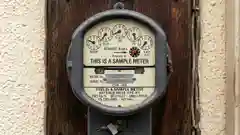
Basic meters measure your electricity usage from one point in time to another and are typically read by a meter reader who visits your site every three months.
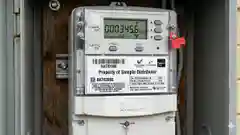
In contrast, smart meters record your energy consumption every 5, 15 or 30 minutes and automatically send this usage data to us.
What does this mean for Red Energy customers?
- •○
Timely and accurate bills
- •○
Monthly billing
- •○
Easier electricity connections
- •○
Access to more detailed usage data
- •○
Ability to manage your energy usage
- •○
Smart meter technology allows us to share usage and billing information with you, all from the convenience of your mobile device. Download the Red Energy App to get started.
Installing or replacing an electricity meter at your property
Red Energy can help you organise the installation of a new smart meter. You may need a new meter connected or your existing meter needs replacing because it is faulty or old. Either way, we have a dedicated team that can coordinate smart meter installations at your premises. In Australia, the process of installing or replacing a meter differs slightly per state. You can choose which state applies to you below.
My meter is old or faulty and needs replacing
If the meter needs to be replaced your distributor will usually contact us to arrange a smart meter upgrade (we may refer to this as a meter exchange). Our trusted metering service partners will be responsible for its supply, installation, testing, maintenance and security. What do I need to do if my meter provider has requested a smart meter upgrade?
- •○
We will notify you in advance with a date for the meter exchange.
- •○
We recommend that you switch off and unplug any electrical or electronic equipment beforehand.
- •○
In most cases the power will need to be off for around an hour (this is called a planned power outage) and if there’s clear access then you don’t need to be home for us to change over your meter.
When the power returns, solar or battery inverters should automatically turn back on but you may wish to double check. If you, someone in your household, or someone who is a resident at your business (such as Aged Care or Caravan Park) has life support equipment, please consider alternative arrangements for this planned power outage.
I would like a new smart meter installed at my property
If you want to upgrade to a smart meter our team can work with you to get the new smart meter up and running. You can call us on 131 806 Monday to Friday 8am–8:30pm, and 9am–5:30pm Saturday AEST/AEDT and we can work together to find a suitable time for the smart meter installation. The following timeframes apply if we haven't agreed on an installation date:
- •○
When installing a new meter - Installation occurs within 11 business days from the date you inform us that the electricity supply connection is in place.
- •○
For meter installations without a change in connection service - Installation occurs within 20 business days after receiving your request.
These timeframes may not apply if there is no agreement for installation, if the site isn’t safe or accessible, or if installing the meter would disrupt another customer’s supply.
You’re in safe hands
We’re working with smart meter experts to help us organise the removal of your old meter and the installation of your new smart meter. Our close partnership with them ensures you receive the same high level of service you expect from Red Energy. At no time will any of our technicians ask you for any sort of direct payment, payment details or your identification.
How we’ll deal with any issues
We’re confident that most meters can be installed or exchanged with minimal fuss and inconvenience. There are a few things which might slow us down and here’s how we’ll deal with them:
- •○
Weather conditions: If poor weather prevents us from reaching your property on the scheduled day, we'll reschedule for a safer time.
- •○
Electrical issues: If our technician identifies any wiring or electrical issues that could compromise safety during the meter exchange, we'll consult with you before proceeding.
- •○
Site defects: If our technician identifies that the existing meter installation has defects or is not safe, we’ll consult with you and discuss next steps.
Smart meters were rolled out in Victoria between 2009 and 2013, this was after the Victorian government made smart meters mandatory. Smart meters were installed by Victoria’s five electricity distributors – AusNet Services, CitiPower, Jemena, Powercor and United Energy. They also own and manage the electricity poles, wires and meters that deliver electricity to your home and business and are responsible for the quality and reliability of your electricity supply. If you are in Victoria and have any questions or concerns about your meter you will need to contact your distributor. You can find out who your distributor is by visiting the Australian Energy Regulator - Victoria website.
Reconnecting and disconnecting smart meters
The process of reconnecting and disconnecting a smart meter differs by each state.
- •○
In VIC, NSW, SA and ACT we are able to reconnect and disconnect smart meters remotely. You can read more about NSW connections and disconnections here.
- •○
In QLD your site will have to be visited to complete the reconnection and disconnection.
If you need to reconnect or disconnect your property please call us on 131 806 Monday to Friday 8am–8:30pm, and 9am–5:30pm Saturday AEST/AEDT.
If you need more information, we are here to chat.
Have any questions? You can call us or send an enquiry directly to our metering team by completing our online enquiry form. Be sure to select ‘New Meter Installation’ or ‘Meter Exchange’ in the drop down box.
Frequently asked questions
1. What does a smart meter look like?
A smart meter is a small, rectangular box with a digital display, usually mounted on an exterior wall. It shows various readings and metrics about your electricity usage.
2. How do I know if I have a smart meter in Australia?
To determine if you have a smart meter, look for a digital display on your meter, as smart meters have digital displays rather than dials. You can also check your electricity bill for detailed usage data or any mention of a "smart meter." If your meter is read remotely, it is likely a smart meter. If you’re still unsure, our local team is here to help.
3. How do I get a smart meter?
If you would like a smart meter installed, all you have to do is call us and we’ll organise a date that suits you. On the day, a technician will install and activate the meter. Afterwards, you can access your electricity usage via the Red Energy App.
4. Why does my bill have a Meter Index Read?
After you have a smart meter installed, you may notice that you now have a ‘Meter Index Read’ on your electricity bill. An Index read is a physical reading taken from the smart meter at a point in time. Your bills are based upon the interval meter data. The index readings show the total energy recorded at the meter since installation and are generally used as a guide only. More information about your bill can be found in Billing and Payment options.
5. How do you read a smart meter?
To read your smart meter, look at the digital display. If there are buttons, press them to cycle through screens showing total kWh used and other metrics. Visit meter reads for some extra help.
6. How do you read a smart meter with solar panels?
To read a smart meter with solar panels, check the digital display for separate readings. Typically, you'll find metrics such as grid consumption, which shows how much electricity you've used from the grid, solar generation indicating the amount of electricity your solar panels have produced, and export, which displays how much excess electricity has been sent back to the grid.